
How to Search Cases by Name
Sherman County's combined County and District Clerk offers the public a case-record route through iDocket. Vendor help calls the name search free. Pick Texas and Sherman County. Type a litigant name, and select a party role if the control shows up. Partial names work, and so does Soundex, a method that catches similar spellings. Businesses get their own vendor guidance.
- Open iDocket from the Sherman County Clerk's official page so the route can be traced to the local record office.
- Select Texas and Sherman County. Enter the last name and first name, or use the company-name method described in help.
- Choose Plaintiff, Defendant, or Either where offered. Try a partial name or Soundex if spelling may vary.
- Review candidate rows by case style, court, type, filing date, and case number. Do not identify a case from a name alone.
- Open the matching result if access permits, note the search date, and confirm material facts with the responsible clerk.
The vendor's own iDocket help page spells out these controls and draws the line between free name searching and paid features.

Treat the interface as a discovery aid. iDocket says it is independent of the court and points users to the clerk for timely, accurate information.
| Field label | Type | Required | Notes |
|---|---|---|---|
| State | Dropdown | Yes for a targeted search | Select Texas. |
| County | Dropdown | Yes for a targeted search | Select Sherman if offered. |
| Litigant | Text | Search term | Use last and first names; partial names are allowed. |
| Party role | Choice | No | Plaintiff, Defendant, or Either where displayed. |
| Soundex or similar | Checkbox | No | Broadens name matching and may add false matches. |
| Company search | Mode or help option | No | Use the vendor's company-name guidance. |
Sherman County iDocket Access Tiers
A free name lookup and a subscriber account are different animals. iDocket reserves advanced search, specific cause-number lookup, deeper case history, tracking, and some document-image functions for subscribers. The advanced fields can cover civil or criminal category. Case type, court, litigant, attorney or bar number, filing dates, and disposition dates also appear.
A broad Sherman County search that drowns you in results? Vendor guidance says add an initial, a court type, or a date window. One that returns nothing? Drop an initial, widen the dates, use fewer criteria, or leave case type blank. These tweaks test the index only. They cannot tell you whether the Clerk holds a paper, internal, sealed, or brand-new case. The public vendor view simply may not show such a file.
The subscriber page marks the boundary between public discovery and paid search or image features.
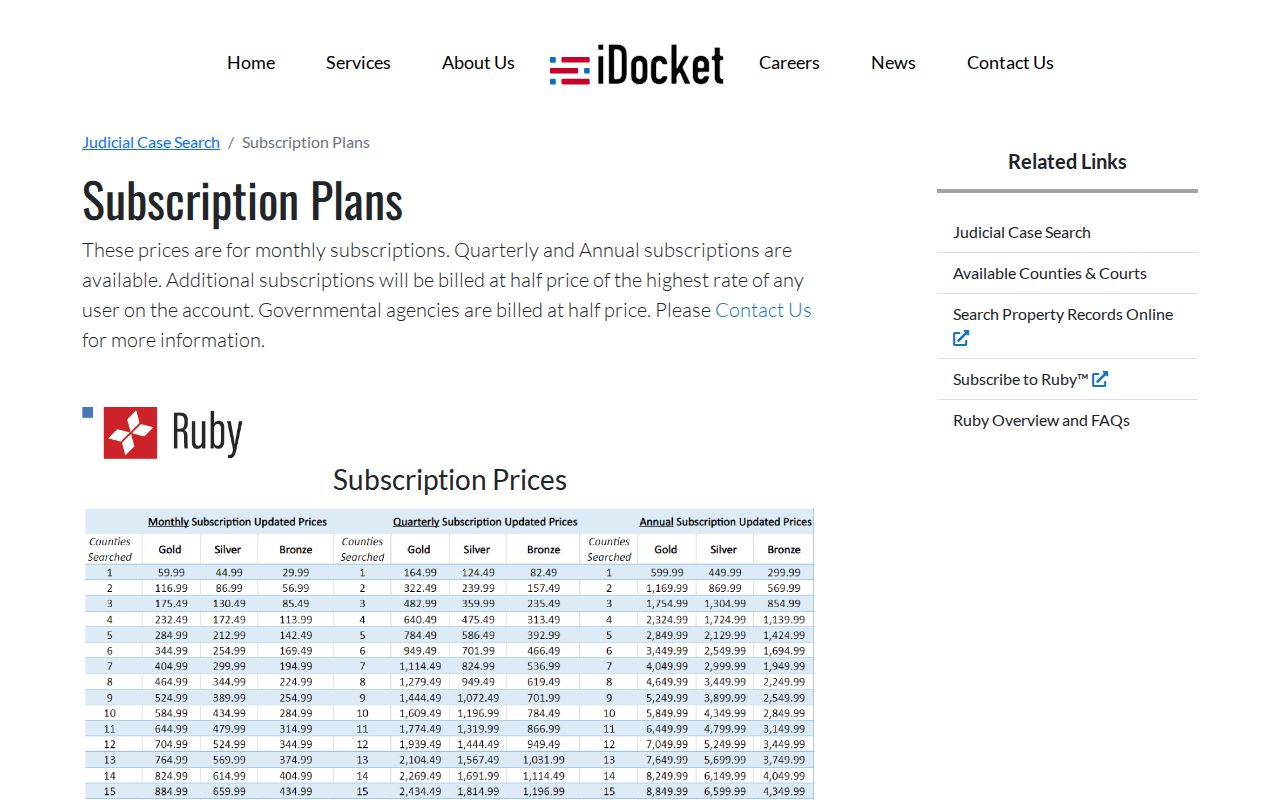
Prices and feature access can change, and a paid result still is not a certified Sherman County court record.
How to Search by Case Number
A case or cause number is the court's file identifier. It usually beats a common name as a match. iDocket help describes a subscriber-only number search built on state, county, and case-number fields. So choose Texas and Sherman County, and enter the number exactly as the court wrote it. A transferred or appealed matter may pick up a new number in the receiving court.
No official help publishes Sherman County's exact local cause-number pattern. Do not invent a year, court code, or prefix. The safe display is Sherman cause number: verify with clerk. Copy every letter, hyphen, and digit straight from the notice or filing. Then ask the clerk whether county, district, JP, and municipal numbers share one lookup.
When a number search fails, the case may sit in a different court. JP matters have their own clerk. Stratford or Texhoma municipal cases cannot be assumed to appear in county iDocket. An appeal lives in the Texas appellate search. A federal number lives in PACER.
Sherman County Advanced Search Fields
Subscribers can stack fields, but more filters do not guarantee a better result. Category splits civil from criminal records. Court and case type narrow the local collection. Litigant and attorney fields help when you know a party or the counsel. Filing-date and disposition-date windows take month, day, and year values. Vendor help notes that a blank endpoint may be ignored.
| Advanced field | Use | Sherman County limit |
|---|---|---|
| Category | Civil, criminal, or all | Does not replace the court selection. |
| Case type | Limits the type of matter | Local labels were not published in the help capture. |
| Court | Narrows the tribunal | JP and municipal coverage should not be assumed. |
| Attorney or bar number | Finds counsel-linked records | Vendor guidance permits a last name and optional first initial. |
| Filing date | Limits when the case began | Broaden the range if a result is missing. |
| Disposition date | Limits recorded case-end dates | A disposition field is not proof of every later event. |
The vendor interface requires cookies. Before you change filters, save the source, the criteria, and the search date so results can be compared fairly.
What a Case Search Shows
A Sherman County result can open into a case header and a chronological history. Depending on the court's participation and your access level, that history may list documents filed, actions, motions, orders, answers or citations, costs, payments, ledger lines, and references. A reference can point to minutes, service, delivery, or another internal notation. Just know the history may lack the court coordinator's current hearing setting.
| Case number | The court's identifier. Verify the precise Sherman County format with the clerk. |
|---|---|
| Style or parties | The formal caption or listed parties. A name match alone does not prove identity. |
| Case type | The category supplied by the court, such as civil or criminal, where public. |
| Filed date | The date the case or document was recorded as filed. |
| Status or disposition | The recorded state or result. Read it with the dated entries and orders. |
| Documents and actions | Indexed filings, motions, orders, service, or other events when the access tier provides them. |
| Financial ledger | Assessments, payments, credits, refunds, or balances, not a stand-alone finding about the case outcome. |
Vendor codes include A+ for assessment and A- for credit or payment. TOF marks an amount applied to a fee or fine, RET a refund or change, and SP payment received. These come from the vendor, not a complete Sherman County codebook.
Verify a Sherman County Case Match
Names repeat. Before trusting a Sherman County docket match, weigh the court, case number, caption, filing date, case type, counsel, and public event history together. A single matching text string proves nothing. The combined County/District Clerk holds the authoritative records for the constitutional county court and the 69th District. That office sits at 701 North 3rd, Stratford, Texas 79084. Mail goes to PO Box 270. Call 806-366-2371, email laurarogers@co.sherman.tx.us, or visit in person. Hours run Monday through Thursday, 8:00 a.m. to 5:00 p.m., and Friday, 8:00 a.m. to noon, with lunch coverage. Before ordering a certified copy, ask about the current method and fee.
Justice-court cases belong with the JP clerk. City cases belong with the municipal clerk. A time-sensitive district setting may also need the 69th District coordinator in Dumas. For the broader calendar picture, the Sherman County court dates resource lays out that path.
County vs Statewide Case Search
Sherman County links its local docket search to iDocket. For statewide reach, re:SearchTX is an account-based electronic court-record system. It offers Cases and Hearings tabs. Its official guide covers searching by docket or case number, party, attorney, and judge-related fields. Wildcards are included too. A case detail page can show parties, attorneys, judicial officers, documents, and hearings. The state portal's official page displays the statewide entry point for searching participating electronic records.
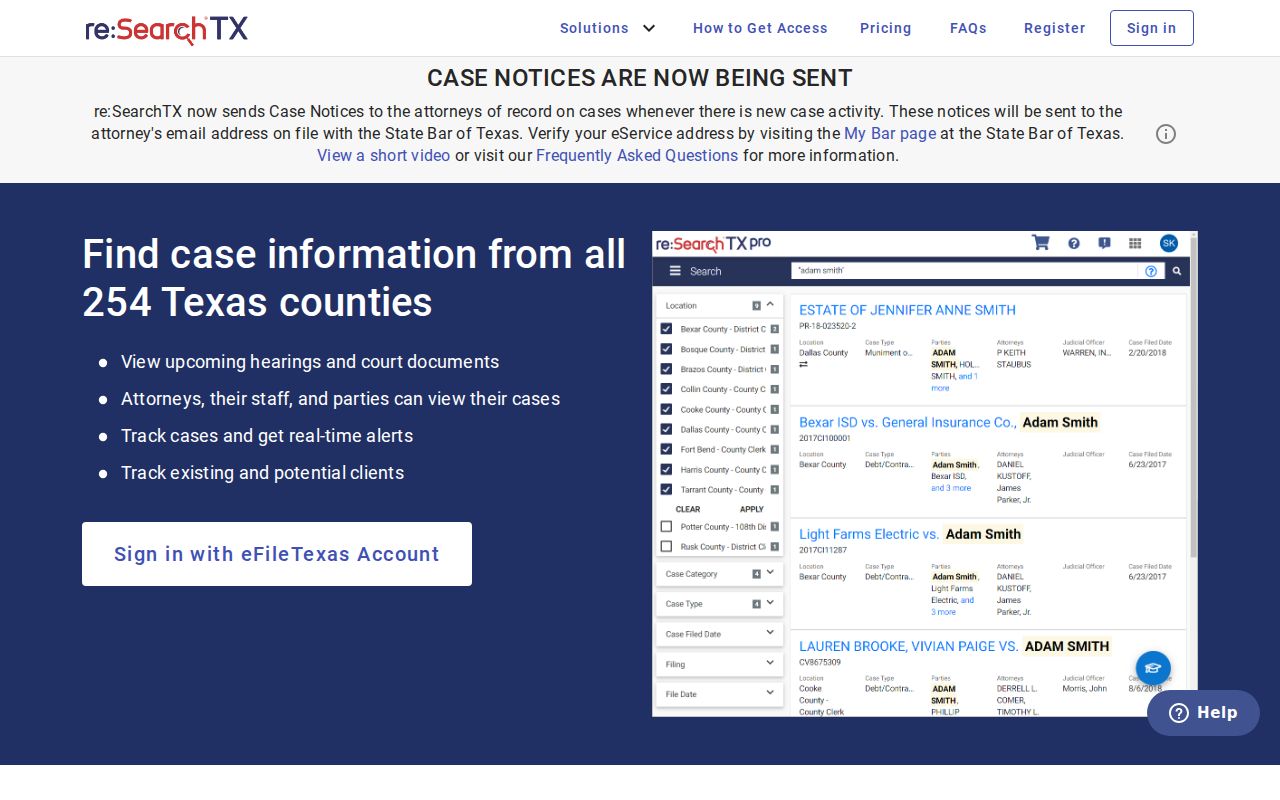
What you see depends on several things. Registration, role, confidentiality, court participation, and record type all shape the results. In its 2024 report, OCA described cases generally dating from 2016, and it noted that criminal case records were not part of the same statewide document corpus.
| Search layer | Coverage | Best use |
|---|---|---|
| iDocket | County-linked local discovery; court participation and access tier vary | A known Sherman County county or district lead |
| re:SearchTX | Participating statewide electronic cases and hearings; login and role limits | Cross-checking state electronic records |
| Texas appellate Case Search | Appeals only; refreshed nightly | A known state appeal from a trial matter |
| PACER | Federal cases in the Northern District of Texas | A Sherman County federal matter assigned to Amarillo |
Sherman County Appeals Search Differently
The Texas appellate Case Search holds no trial-court cases at all. It works differently. It offers appellate case and document tabs plus a court selector. You can search by full or partial appellate number, civil or criminal choice, filed-date range, and style. Attorney or bar number works too. Trial case number, trial county, and trial court are also searchable fields. Data refreshes nightly, not in real time. The official search interface documents those appellate fields and its scope warning.
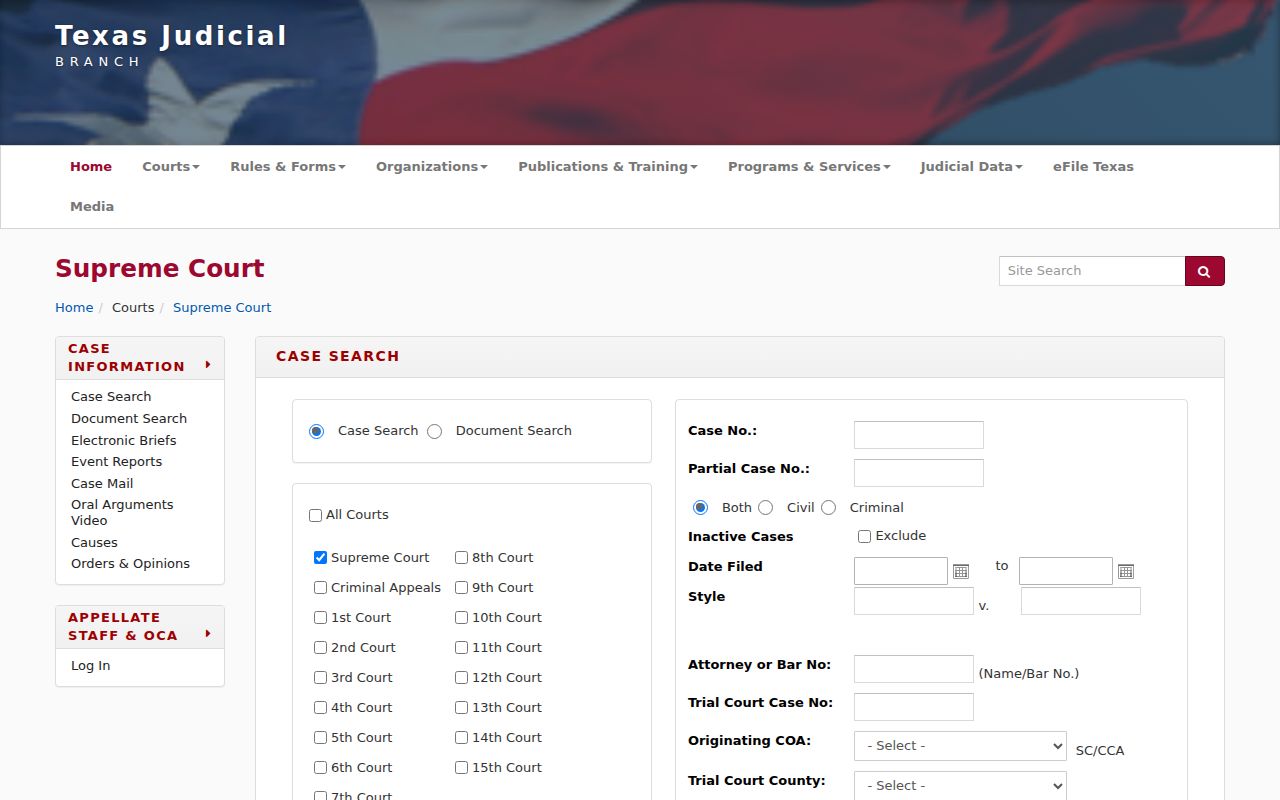
When a field allows it, cross-reference the trial number or Sherman County. Still, confirm any appellate result with the appellate clerk. A new appellate number never replaces the local trial record.
Restricted Cases and Access Rules
Not every Sherman County case is equally open to the public. Juvenile records carry special confidentiality requirements under Texas Family Code Chapter 58. A sealed record can vanish from ordinary search. It may show only a limited header. Or it can keep its documents back. Family, probate, and mental-health categories exist in the clerk's case-management system. That does not mean they are fully public.
Texas Rule of Civil Procedure 76a starts from a presumption that court records are open. It also prescribes a specific process for sealing. Appellate rules require redaction of listed personal and financial identifiers. Rule 12 covers judicial records outside adjudicative case files. The Texas Public Information Act is no universal substitute for a court-record request.
No result is not “no case.” Say that a case was not found in the public source, then check the court, spelling, dates, access tier, and responsible clerk.
Never email Social Security numbers, account numbers, or other sensitive data a request does not truly need. Ask instead how restricted material must be transmitted and what proof of authority the office requires.
Log a Sherman County Search
Dockets shift constantly. Courts add filings, fix entries, pull documents from view, and revise hearing calendars without warning. So keep a simple log of each search. Record the portal used, the date checked, the exact name or case number, the court selected, any filters, and anything that needed follow-up. Saving or printing what the public interface showed can preserve a moment in a case lookup. But that copy is not a certified record.
When accuracy matters, go to the source. For an official filing, an appeal, a title question, or genealogy work, ask the clerk where the case originated. Request a current verified or certified copy. Sherman County itself warns that official county records come from the Clerk's Office. Any other version may be unofficial or lack the Clerk's approval.
Note: Treat every Sherman County case lookup as a dated snapshot. Cite the court that supplied the official record.